Skip to content
Home/Projects/Receipt Scanner
Case study · 38 / 39
On-Device Document AI

On-device receipt scanner for expense data.

A Core ML receipt workflow for users who need quick expense capture without sending every receipt to a remote service.

[ Client review ]

Receipt Scanner made the workflow easier to explain: the inputs, AI review, human handoff, and business action are all visible in one place.

Product team
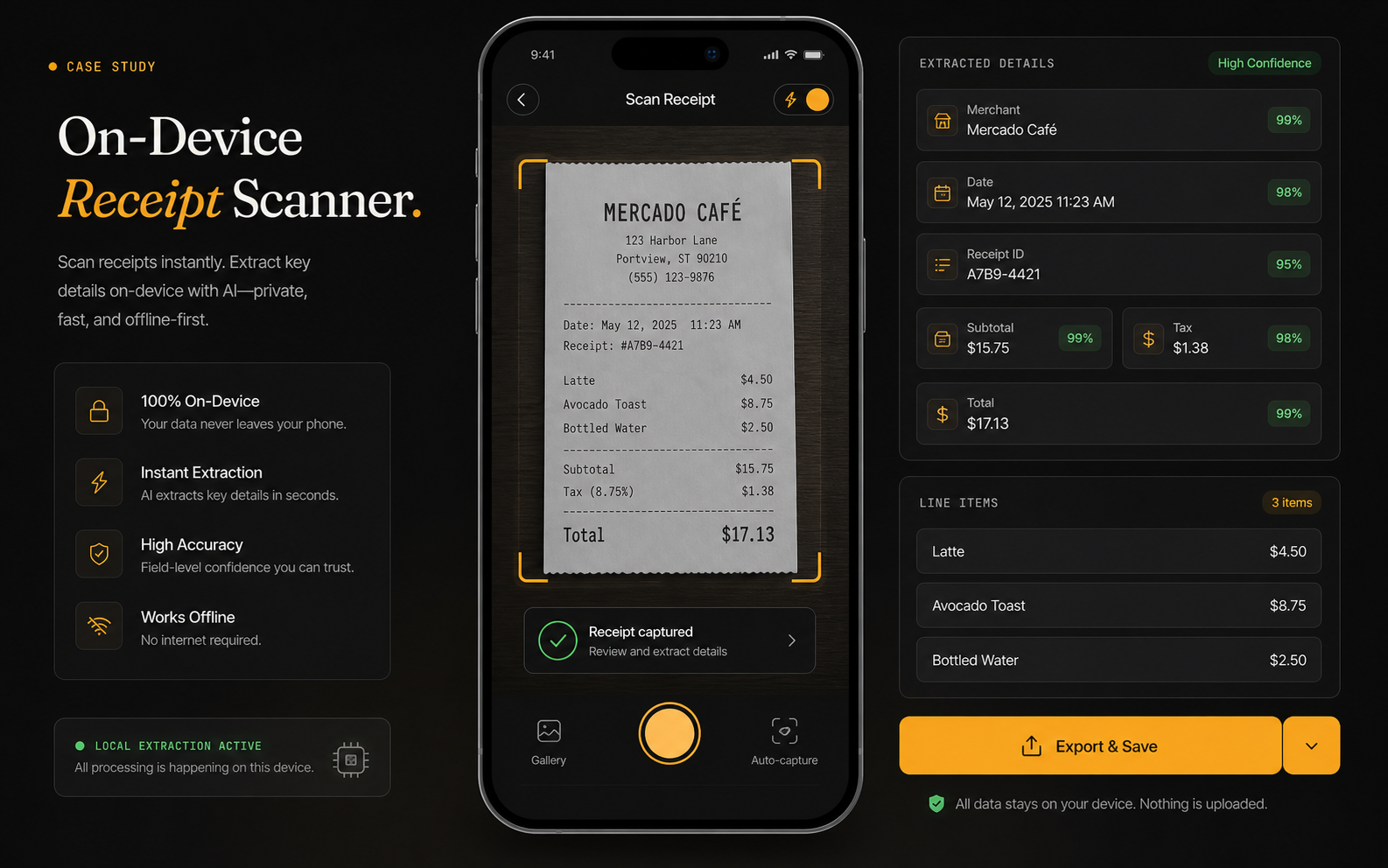
Core ML receipt scanner extracting structured expense data directly on-device.
Select case study
CS / 38Receipt ScannerExpense capture · Local extraction
CS / 01ThalamusDocument automation · Knowledge searchCS / 02AletheiaVoice AI · Video reviewCS / 03FRCMConstruction contracts · Review automationCS / 04RetinaRetail forecasting · Python automationCS / 05CrayoAI video · Short-form automationCS / 06MusicfyGenerative audio · Voice cloningCS / 07Just ListenAudiobooks · Subscription audioCS / 08Study PotionEducation AI · Study automationCS / 09GoMoon.aiTrading analytics · Economic calendarCS / 10RevanaAI support staff · Sales automationCS / 11TrailblazerSEO · Content growthCS / 12CoversaIQCall center AI · Agent coachingCS / 13AI Voice SystemRealtime voice · Twilio automationCS / 14Resume ScreenerRecruiting agents · OCR workflowCS / 15Document OCRHybrid search · OCR pipelinesCS / 16Credit ScoringRisk modeling · Explainable MLCS / 17Content SafetyVision AI · RecommendationsCS / 18AI Inbox TriageInbox automation · CRM routingCS / 19Invoice PO AutomationFinance extraction · Human reviewCS / 20Meeting CRM AgentSales calls · CRM updatesCS / 21Knowledge AssistantInternal documents · Cited answersCS / 22Healthcare RCM AssistantClaim review · Appeal supportCS / 23Voice Appointment SetterLead qualification · Calendar bookingCS / 24AI Quality GuardrailsPrompt QA · Safety checksCS / 25Spreadsheet DashboardSpreadsheet cleanup · KPI dashboardCS / 26Contract Change MonitorDocument comparison · Policy riskCS / 27Ad Creative GeneratorCreative testing · Ad variantsCS / 28Churn Risk PredictorCustomer health · Retention signalsCS / 29Recruiting Outreach AgentCandidate matching · Outreach draftsCS / 30Retail Shelf IntelligenceShelf monitoring · Restock alertsCS / 31CoreFit Pose CoachCore ML · Pose trackingCS / 32DefectLens QADefect detection · Human reviewCS / 33ModelOps CommandModel monitoring · Retraining alertsCS / 34PrivacyScanCore ML · Local redactionCS / 35AutoLabel StudioAI pre-labels · Human reviewCS / 36FleetCam SafetyDashcam analysis · Driver coachingCS / 37FieldVision SearchField photos · OCR snippetsCS / 38Receipt ScannerExpense capture · Local extractionCS / 39EvalForge BenchModel comparison · Regression testing
Find related work
Choose a workflowChoose a business problemStart with the kind of workflow you want to improve, then see the closest work.
AutomationAutomationsRepeatable work turned into a reliable workflow, dashboard, or internal tool.ChatbotChatbotSupport and internal assistants that answer from the right company material.PythonPython ScriptsSmall scripts that clean data, connect tools, run reports, or power a workflow.MVP SaaSMVP SaaSLean SaaS builds that prove the product, workflow, and buyer story quickly.Voice AIVoice AIVoice, audio, and conversation tools for review, routing, and decision support.DocumentsDocument ReviewContract, PDF, and knowledge-base tools that make buried details easy to act on.AI AgentsAI Agents & Workflow AutomationAgentic systems that classify work, draft actions, route tasks, and keep humans in control.AssistantsAI Assistants & Knowledge ChatAssistants that answer questions from internal context, documents, and tool data.Document AIDocument AI & Knowledge SearchParsing, extraction, OCR, comparison, and retrieval systems for document-heavy work.Voice IntelVoice AI & Conversation IntelligenceVoice, call, and meeting systems that extract next steps, signals, and follow-up actions.VisionComputer VisionAI systems that analyze images, video, screenshots, camera feeds, and inspection data.On-deviceCore ML & On-Device AIMobile AI workflows that run locally for privacy, speed, or offline use.MLOpsMLOps & AI InfrastructureMonitoring, evaluation, versioning, and operations for AI systems in production.ForecastingForecasting & Decision IntelligencePredictive systems that turn business data into risk, demand, revenue, or planning signals.RevenueGrowth & Revenue AutomationAutomation for lead routing, churn prevention, outreach, CRM updates, and sales follow-up.Creator ToolsGenerative Media & Creator ToolsCreative workflows for hooks, scripts, captions, variants, audio, and video production.Risk & EvalRisk, Compliance & AI EvaluationGuardrails, review queues, policy checks, regression tests, and risk-scored AI workflows.Data OpsData Automation & LabelingData cleanup, labeling, validation, KPI reporting, and human review workflows.Edge AIEdge AIAI workflows designed for local hardware, constrained devices, and near-source processing.Health AIHealth/Fitness AIHealth, revenue cycle, fitness, and coaching workflows with careful review boundaries.ManufacturingManufacturing AIInspection, anomaly detection, QA review, and production-floor AI workflows.
Client

Receipt Scanner

Expense capture · Local extraction

Engagement

Product narrative

Positioning · workflow story · product proof

Role

AI builder

On-Device Document AI workflow

Year

2026

Project positioning

Buyer caseon-device document ai outcomes
Scan
Receipt capture

Phone camera input

Fields
Extraction

Merchant, date, tax, total

Lines
Items

Expense details parsed

Export
Handoff

Structured data leaves app

Expense capture is tedious when receipt data has to be entered manually.

Users need a phone workflow that scans receipts, extracts fields, supports quick review, and exports structured records.

The workflow needed a visual and operational story that buyers can scan quickly: what comes in, what the AI does, what a human reviews, and where the result lands.

Thermal prints, photos, tax formats, and line items all differ.

Expense reports depend on accurate tax and total fields.

Blur, shadows, and angle affect OCR.

Finance tools need normalized records, not screenshots.

We made receipt extraction a mobile review flow.

The receipt scanner shows phone capture, extracted field cards, line items, and an export button.

The project is framed around the business workflow itself: the source inputs, AI review, approval points, and final handoff are all visible in one story.

  • Phone frame with receipt scan.
  • Extracted merchant, date, total, tax, and line items.
  • Reviewable field cards.
  • Export button for expense handoff.

Mobile frame

The experience is shown where capture happens.

Field cards

Users can review each extracted value.

Line-item support

The workflow goes beyond simple totals.

Export state

The end of the workflow is a usable expense record.

Week 1

Workflow audit

Mapped source inputs, users, review points, and the final business action.

Week 2

AI task design

Defined classification, extraction, drafting, prediction, or detection responsibilities.

Week 3

Human review path

Added approval, exception, and escalation points where judgment matters.

Week 4

Product narrative

Turned the workflow into a clear buyer story for sales conversations, reviews, and handoff.

Capture speedReceipts become structured quickly.
86
PrivacyExtraction can run locally.
84
Expense qualityFields are reviewed before export.
80
Workflow fitData can move to finance tools.
82
[ 01 ] Sources
Device inputs
  • Receipt image
  • Camera frame
  • Expense rules
  • Local model
[ 02 ] Prepare
Extraction prep
  • OCR
  • Field detection
  • Line items
  • Confidence
[ 03 ] Decide
Review decision
  • Merchant
  • Date
  • Tax
  • Total
[ 04 ] Deliver
Expense handoff
  • CSV export
  • Accounting sync
  • User approval
  • Receipt archive

Receipt scanning needs clean extraction and quick user review before expense export.

Clearer product surface: Receipt Scanner now communicates the workflow through the actual review states, handoffs, and outcomes buyers care about.

Faster buyer clarity: the problem, workflow, proof points, and next action are easy to understand without a technical walkthrough.

"

Receipt Scanner made the workflow easier to explain: the inputs, AI review, human handoff, and business action are all visible in one place.

P
Product team
Sources
  • Receipt image
  • Camera frame
  • Expense rules
  • Local model
Processing
  • OCR
  • Field detection
  • Line items
  • Confidence
Answer layer
  • Merchant
  • Date
  • Tax
  • Total
Delivery
  • CSV export
  • Accounting sync
  • User approval
  • Receipt archive
Governance
  • Human review
  • Audit trail
  • Quality checks
  • Fallback rules
Book a call

Got a problem AI might solve? Let's find out.

30 minutes. Free. No NDA needed. You leave with a clear yes-or-no on whether to build — and a one-pager you can forward to your team the same day.

[ Response ]

Within 24 hours

[ Timezone ]

GMT+5 · flexible

[ Discovery ]

Free · no NDA needed

[ Engagement ]

$1,000 / week sprint