AI inbox triage and reply assistant for priority work.
A workflow assistant for teams whose revenue, support, and operational work still starts in a crowded shared inbox.
AI Inbox Triage made the workflow easier to explain: the inputs, AI review, human handoff, and business action are all visible in one place.
— Product team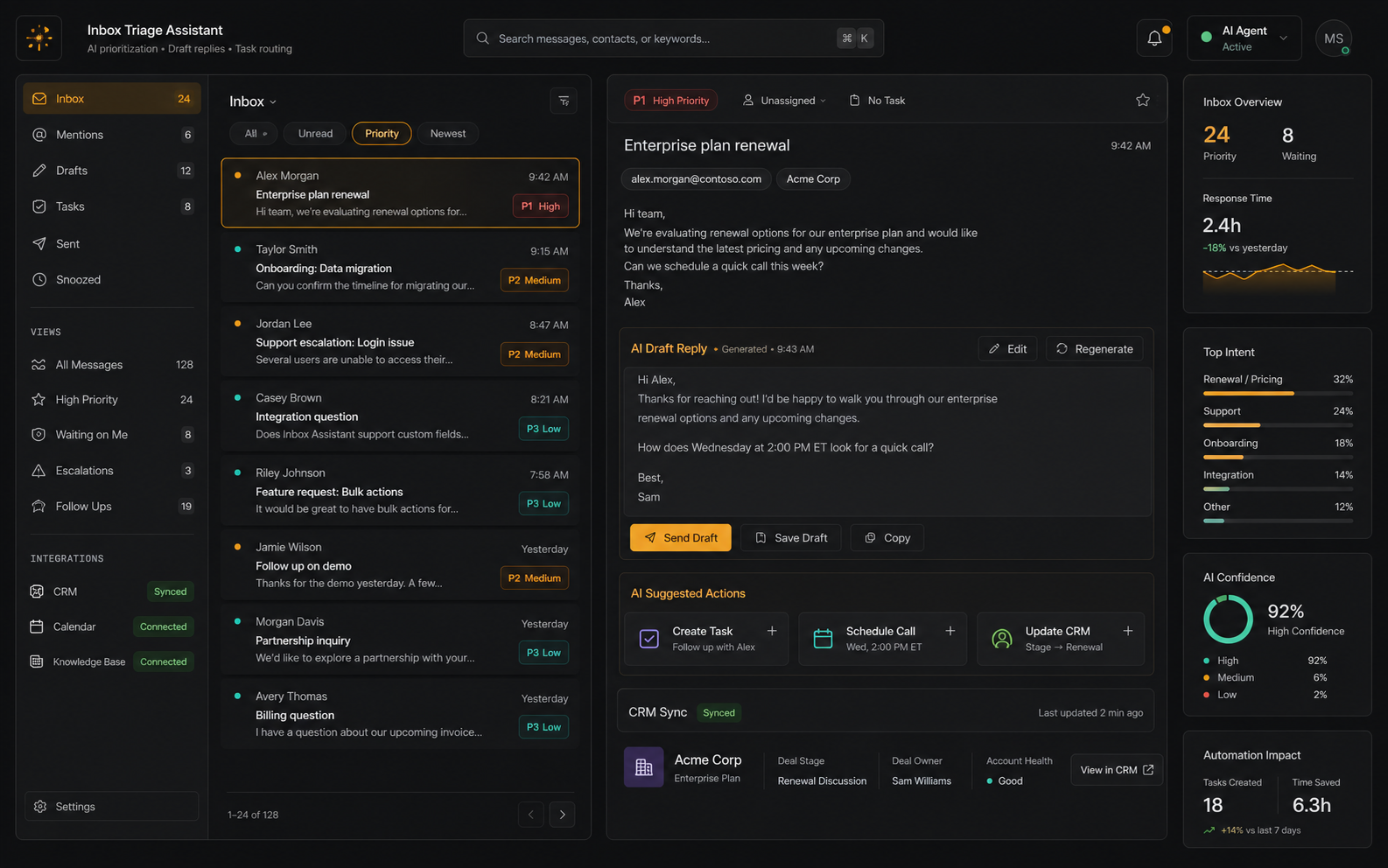
Urgent emails move first
Human-reviewable responses
Follow-up work is assigned
Customer context stays current
Shared inboxes mix urgent revenue work with routine operational noise.
Teams need to identify priority messages, prepare a useful reply, and make sure the next action is tracked without manually copying context between tools.
The workflow needed a visual and operational story that buyers can scan quickly: what comes in, what the AI does, what a human reviews, and where the result lands.
A message can be urgent because of the customer, revenue stage, or SLA, not only its wording.
Drafts must be fast to approve and easy to edit before sending.
The team needs proof that a task and CRM status were actually created.
Threads, attachments, and partial context require careful fallback behavior.
We modeled the inbox as a routing system, not a pile of messages.
The assistant classifies each email, drafts the next response, creates the task when needed, and shows CRM sync status so a human can approve the action.
The project is framed around the business workflow itself: the source inputs, AI review, approval points, and final handoff are all visible in one story.
- Email list with priority labels.
- Draft reply panel with editable output.
- Create-task action and owner assignment.
- CRM sync indicator for closed-loop handoff.
Priority badges
The card visual makes urgency visible before the user reads the full message.
Draft panel
Generated replies are shown as editable work, not automatic sends.
Task handoff
Create-task state is part of the visual proof.
CRM status
Sync indicators reduce ambiguity after routing.
Workflow audit
Mapped source inputs, users, review points, and the final business action.
AI task design
Defined classification, extraction, drafting, prediction, or detection responsibilities.
Human review path
Added approval, exception, and escalation points where judgment matters.
Product narrative
Turned the workflow into a clear buyer story for sales conversations, reviews, and handoff.
- Shared inbox
- CRM records
- Support history
- SLA rules
- Intent
- Priority
- Customer context
- Owner lookup
- Reply draft
- Task creation
- Routing status
- Escalation
- CRM sync
- Inbox label
- Owner alert
- Review queue
AI Inbox Triage works when every recommendation stays attached to the original email, customer record, and next action.
Clearer product surface: AI Inbox Triage now communicates the workflow through the actual review states, handoffs, and outcomes buyers care about.
Faster buyer clarity: the problem, workflow, proof points, and next action are easy to understand without a technical walkthrough.
AI Inbox Triage made the workflow easier to explain: the inputs, AI review, human handoff, and business action are all visible in one place.
- Shared inbox
- CRM records
- Support history
- SLA rules
- Intent
- Priority
- Customer context
- Owner lookup
- Reply draft
- Task creation
- Routing status
- Escalation
- CRM sync
- Inbox label
- Owner alert
- Review queue
- Human review
- Audit trail
- Quality checks
- Fallback rules
Got a problem AI might solve? Let's find out.
30 minutes. Free. No NDA needed. You leave with a clear yes-or-no on whether to build — and a one-pager you can forward to your team the same day.