PrivacyScan on-device redaction for sensitive fields.
A Core ML privacy workflow for users who need to find and redact PII without uploading documents to cloud services.
PrivacyScan made the workflow easier to explain: the inputs, AI review, human handoff, and business action are all visible in one place.
— Product team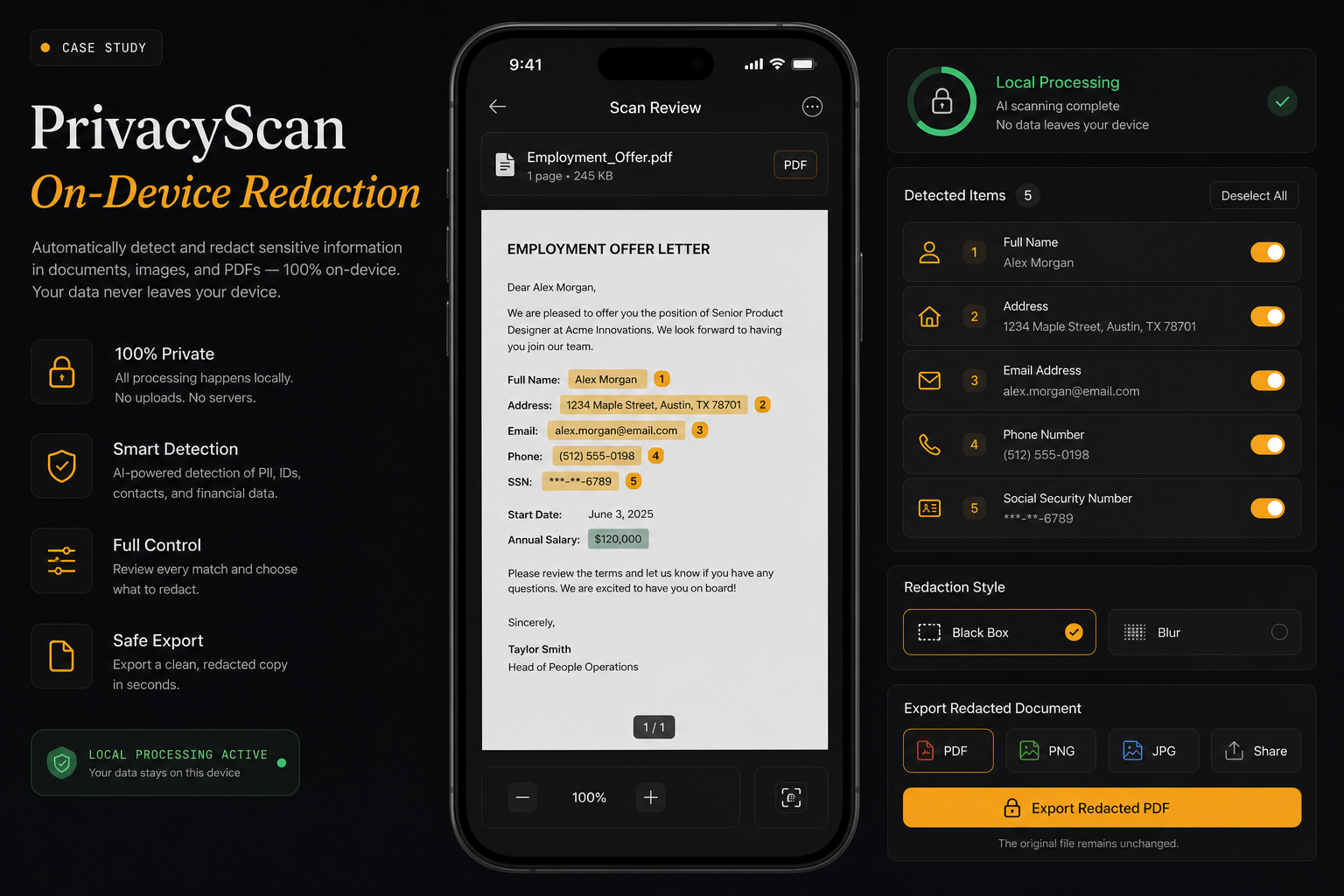
Sensitive fields highlighted
No cloud upload required
User controls each field
Redacted document created
Sensitive documents need AI help, but uploading them can create privacy risk.
Users need local detection, clear field highlights, and redaction controls before exporting a safe version.
The workflow needed a visual and operational story that buyers can scan quickly: what comes in, what the AI does, what a human reviews, and where the result lands.
False negatives can expose sensitive data.
Automatic redaction should still be editable.
Performance and accuracy must fit mobile hardware.
Users need confidence that the shared copy is redacted.
We made local processing visible in the mobile UI.
The privacy scanner shows document preview, highlighted PII, redaction toggles, and an on-device processing badge.
The project is framed around the business workflow itself: the source inputs, AI review, approval points, and final handoff are all visible in one story.
- Document preview with highlighted PII.
- Redaction toggles for each field.
- Local processing badge.
- Export button for safe copies.
Phone preview
The redaction experience is shown as a real mobile workflow.
PII highlights
Detected sensitive fields are visible before export.
Toggle controls
Users can decide what to redact.
Local badge
On-device processing is surfaced as a trust signal.
Workflow audit
Mapped source inputs, users, review points, and the final business action.
AI task design
Defined classification, extraction, drafting, prediction, or detection responsibilities.
Human review path
Added approval, exception, and escalation points where judgment matters.
Product narrative
Turned the workflow into a clear buyer story for sales conversations, reviews, and handoff.
- Document scan
- Text regions
- User settings
- Local model
- OCR
- PII detection
- Field grouping
- Confidence
- Sensitive fields
- Toggle state
- Preview
- Warnings
- Redacted PDF
- Local save
- Share sheet
- Audit note
On-device privacy tools need to show users what is detected and what leaves the device.
Clearer product surface: PrivacyScan now communicates the workflow through the actual review states, handoffs, and outcomes buyers care about.
Faster buyer clarity: the problem, workflow, proof points, and next action are easy to understand without a technical walkthrough.
PrivacyScan made the workflow easier to explain: the inputs, AI review, human handoff, and business action are all visible in one place.
- Document scan
- Text regions
- User settings
- Local model
- OCR
- PII detection
- Field grouping
- Confidence
- Sensitive fields
- Toggle state
- Preview
- Warnings
- Redacted PDF
- Local save
- Share sheet
- Audit note
- Human review
- Audit trail
- Quality checks
- Fallback rules
Got a problem AI might solve? Let's find out.
30 minutes. Free. No NDA needed. You leave with a clear yes-or-no on whether to build — and a one-pager you can forward to your team the same day.