Invoice and purchase order automation for finance review.
A finance intake system that turns vendor documents into structured fields with validation checks and review queues.
Invoice PO Automation made the workflow easier to explain: the inputs, AI review, human handoff, and business action are all visible in one place.
— Product team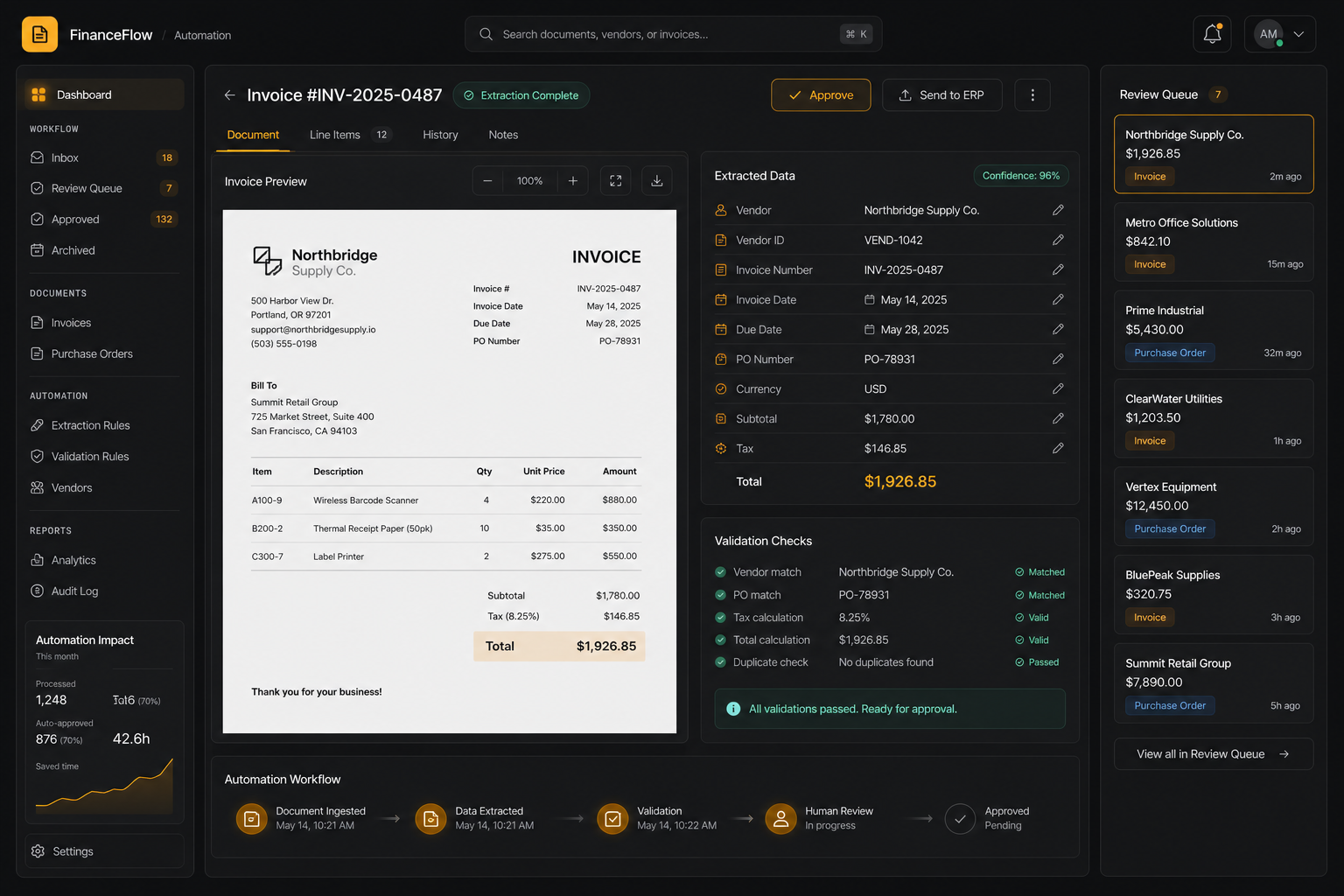
Vendor, dates, tax, and totals
Three-way checks before export
Exceptions go to finance
Clean records leave the workflow
Finance teams lose time checking invoice fields and purchase order matches by hand.
The system needs to extract structured data, verify math, detect mismatches, and keep finance in control when confidence drops.
The workflow needed a visual and operational story that buyers can scan quickly: what comes in, what the AI does, what a human reviews, and where the result lands.
Layouts, fields, and line-item formats change constantly.
Subtotal, tax, and total mismatches need explicit validation states.
A valid invoice still needs vendor, purchase order, and receiving context.
Human review must be clear when confidence or matching fails.
We split document extraction from finance approval.
The finance workspace shows the invoice preview beside extracted fields, validation states, and a human review queue for exceptions.
The project is framed around the business workflow itself: the source inputs, AI review, approval points, and final handoff are all visible in one story.
- Invoice preview beside structured fields.
- Vendor, date, subtotal, tax, and total extraction.
- Validation checks for PO match and totals.
- Human review queue for exceptions.
Side-by-side review
Preview and extracted fields stay together for faster checking.
Validation badges
Pass, warning, and review states are visible at field level.
Human queue
Exceptions become a managed workflow instead of a hidden failure.
Audit trail
Every extracted field can be traced to the source document.
Workflow audit
Mapped source inputs, users, review points, and the final business action.
AI task design
Defined classification, extraction, drafting, prediction, or detection responsibilities.
Human review path
Added approval, exception, and escalation points where judgment matters.
Product narrative
Turned the workflow into a clear buyer story for sales conversations, reviews, and handoff.
- Invoices
- POs
- Vendor master
- ERP records
- OCR
- Field parsing
- Line items
- Totals
- PO match
- Tax check
- Duplicate check
- Confidence
- Exception queue
- Approval
- ERP export
- Audit log
Invoice automation is useful when extraction, validation, and approval are visible in one review surface.
Clearer product surface: Invoice PO Automation now communicates the workflow through the actual review states, handoffs, and outcomes buyers care about.
Faster buyer clarity: the problem, workflow, proof points, and next action are easy to understand without a technical walkthrough.
Invoice PO Automation made the workflow easier to explain: the inputs, AI review, human handoff, and business action are all visible in one place.
- Invoices
- POs
- Vendor master
- ERP records
- OCR
- Field parsing
- Line items
- Totals
- PO match
- Tax check
- Duplicate check
- Confidence
- Exception queue
- Approval
- ERP export
- Audit log
- Human review
- Audit trail
- Quality checks
- Fallback rules
Got a problem AI might solve? Let's find out.
30 minutes. Free. No NDA needed. You leave with a clear yes-or-no on whether to build — and a one-pager you can forward to your team the same day.